Processing for ieeg.org (natus2mef → validate → upload)
Shared with the CNT
This procedure runs on infrastructure the lab and the CNT operate together. The CNT manual keeps its own copy; changes to the shared steps are agreed with the CNT.
What this page tells you
Full ieeg.org processing commands for Intracranial, CCEPS, Gottfried, and Gold recordings: natus2mef in a screen, mefvalidate, redact PHI annotations, copy annotation and montage files to cnt-fs, delete original annotations, ieeg upload-directory to the right project, then build config folders. Notify Erin Conrad or the Gottfried Lab coordinator afterward.
Process and upload the EEG files after you have set up the metadata files and exported the recordings from Natus. There are five steps in this process:
- Natus to mef conversion
- Validate the mef
- Redact annotations
- After you redact the PHI, copy both annotations files and the montages to cnt-fs.
- Delete the original annotations JSON file from the mef.
- Upload to ieeg.org
- Make config files
The commands for each type of EEG file are given below.
Replace XXX with the patient's HUP ID in a text editor (for example Sublime Text) before running the commands.
Intracranial_EEG
First, log into the VDI and enter cnt1 in MobaXterm with this command: ssh cnt1
-
If the VDI logs you out, the server name is connect.pmacs.upenn.edu.
-
Natus to mef conversion
Make sure that the EEG file times do not overlap before you run this conversion. If they overlap, the natus2mef conversion fails. In that case, split the dataset into two separate natusdir files (labeled D01 and D02) and process each one separately. Adjust the file names in the commands below to match. Instructions are here: Splitting Datasets (Splitting Datasets)
In cnt1:
First open a new screen, so that the mef conversion can run for a few hours until it is complete:
Inside the new screen, run:
./natus2mef -c /mnt/cnt-fs/eeg_raw/ieeg_raw/HUPXXX/Intracranial_EEG/HUPXXX_natusDir.txt -m /mnt/cnt-fs/eeg_raw/ieeg_raw/HUPXXX/Intracranial_EEG/HUPXXX_channelMapping.txt -o /project/eeg_process/HUPXXX/HUPXXX_mef >/mnt/cnt-fs/eeg_raw/ieeg_raw/HUPXXX/Intracranial_EEG/HUPXXX_convert_log 2>&1The
--no-annotation-filtersflag is not used for the intracranial conversion.Press Ctrl+a, then d to leave the screen.
To go back into the screen and check on it:
screen -ls lists all available screens.
screen -r XXXX reattaches to the screen with that number.
Ctrl+a, then Ctrl+\ terminates a screen.Once the conversion has finished, type exit to close the screen.
To check that the conversion succeeded, open the HUPXXX_convert_log file in cnt-fs in ieeg_raw/HUPXXX. Right-click on the convert log, open it in Notepad++, and scroll to the bottom. It should say “processing successful”. If the processing failed, the error is shown in this file.
-
Mef validate
In cnt1:
-
Redact annotations
- Run the redact annotations script.
- If you accidentally delete an annotation that should have stayed in, or keep an annotation that should have been deleted, press Ctrl+C to end the script, and then start over. Alternatively, finish the rest of the annotations, copy the file to cnt-fs, open the file, and remove the one you missed by hand.
- When done, copy both annotations files and the montages to cnt-fs.
- Delete the original annotations file from the mef (if it contains PHI).
Remove anything next to the line "type" that contains PHI, such as pronouns, names, or initials of the patient.
In cnt1:
python redact_annots_python3.py /project/eeg_process/HUPXXX/HUPXXX_mef/annotations.iann.json /project/eeg_process/HUPXXX/HUPXXX_mef/annotations_edit.iann.jsonIf you get the error message shown below, run:
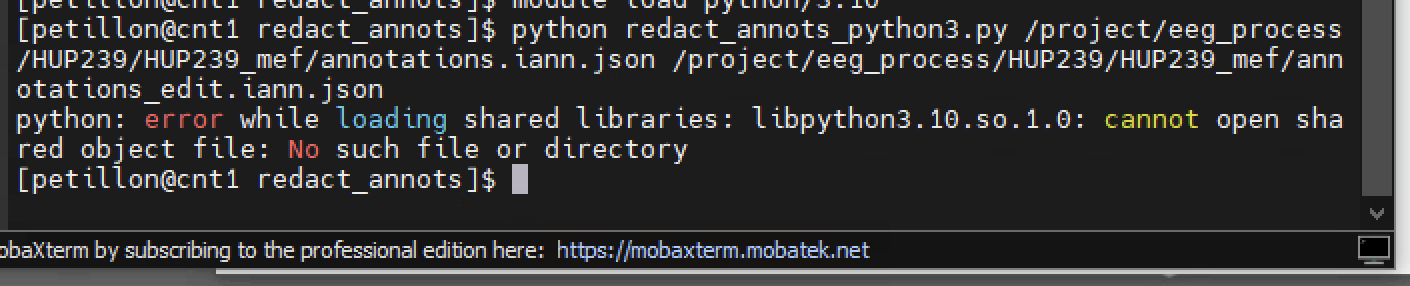
Once you have redacted the annotations (any with PHI), enter the mef folder that you just created:
From here, copy both annotations files and the montages to cnt-fs, and then delete the original annotations file (annotations.iann.json) from the mef. The original must not be uploaded to ieeg.org because it contains PHI.
Delete the original annotations file before uploading if it contains PHI. This is needed only if you edited the original.
- Run the redact annotations script.
-
Upload to ieeg.org
In cnt1:
First open a new screen, so that the ieeg upload can run for a few hours until it is complete:
Upload to ieeg.org with the command below:
./ieeg upload-directory -n 'Human_Data/Hospital of the University of Pennsylvania/HUP_Intracranial_Data/HUPXXX_phaseII' '/project/eeg_process/HUPXXX/HUPXXX_mef'Datasets are no longer uploaded to the HUP_SEEG project.
Press Ctrl+a, then d to leave the screen.
To go back into the screen and check on it:
screen -ls lists all available screens.
screen -r XXXX reattaches to the screen with that number.Once the upload is complete, type exit to close the screen.
-
Make config files
- When your processing is done, go to the eeg_raw/ieeg_raw/HUPXXX/Intracranial_EEG folder in cnt-fs and place the files below in a folder called config_intracranial. When all processing for this patient is done, this folder is placed in a master config folder in ieeg_metadata.
- Natusdir
- Data Collection
- Convert log
- annotations.iann.json
- annotations_edit.iann.json
- Montages
- channel mapping
- When your processing is done, go to the eeg_raw/ieeg_raw/HUPXXX/Intracranial_EEG folder in cnt-fs and place the files below in a folder called config_intracranial. When all processing for this patient is done, this folder is placed in a master config folder in ieeg_metadata.
CCEPS
First, log into the VDI and enter cnt1 in MobaXterm with this command: ssh cnt1
-
If the VDI logs you out, the server name is connect.pmacs.upenn.edu.
-
Natus to mef conversion
In cnt1:
CCEPS recordings are converted with machine annotations, using the
--no-annotation-filtersflag:./natus2mef --no-annotation-filters -c /mnt/cnt-fs/eeg_raw/ieeg_raw/HUPXXX/Research/CCEPS/HUPXXX_CCEPS_natusDir.txt -m /mnt/cnt-fs/eeg_raw/ieeg_raw/HUPXXX/Research/CCEPS/HUPXXX_channelMapping.txt -o /project/eeg_process/HUPXXX/HUPXXX_CCEPS_mef >/mnt/cnt-fs/eeg_raw/ieeg_raw/HUPXXX/Research/CCEPS/HUPXXX_CCEPS_convert_log 2>&1To check that the conversion succeeded, open the HUPXXX_CCEPS_convert_log file in cnt-fs in ieeg_raw/HUPXXX/Research/CCEPS. Right-click on the convert log, open it in Notepad++, and scroll to the bottom. It should say “processing successful”. If the processing failed, the error is shown in this file.
-
Mef validate
In cnt1:
-
Redact annotations
- Run the redact annotations script.
- If you accidentally delete an annotation that should have stayed in, or keep an annotation that should have been deleted, press Ctrl+C to end the script, and then start over.
- When done, copy both annotations files and the montages to cnt-fs.
- Delete the original annotations file from the mef.
- Run the "edit_annots_cceps.py" script to de-identify the "Annotator" field and to check whether any channels are missing.
Remove anything next to the line "type" that contains PHI, such as pronouns, names, initials of the patient, or the room number.
In cnt1:
python redact_annots_python3.py /project/eeg_process/HUPXXX/HUPXXX_CCEPS_mef/annotations.iann.json /project/eeg_process/HUPXXX/HUPXXX_CCEPS_mef/annotations_edit.iann.jsonOnce you have redacted the annotations (any with PHI), enter the mef folder that you just created:
From here, copy both annotations files and the montages to cnt-fs, and then delete the original annotations file (annotations.iann.json) from the mef. The original must not be uploaded to ieeg.org because it contains PHI.
Delete the original annotations file before uploading if it contains PHI.
In cnt1:
python edit_annots_cceps.py /mnt/cnt-fs/eeg_raw/ieeg_raw/HUPXXX/Research/CCEPS/annotations_edit.iann.json /mnt/cnt-fs/eeg_raw/ieeg_raw/HUPXXX/Research/CCEPS/HUPXXX_channelMapping.txtThis script removes every entry in the "Annotator" header of the annotations JSON file and replaces it with "null". It also cross-checks the "Closed relay to ...." annotations in the annotations JSON file against the channel mapping file, and it alerts you if any channels are missing from the channel mapping.
- Run the redact annotations script.
-
Upload to ieeg.org
In cnt1:
-
Make config files
- When your processing is done, go to the eeg_raw/ieeg_raw/HUPXXX/Research/CCEPS folder in cnt-fs and place the files below in a folder called config_CCEPS. When all processing for this patient is done, this folder is placed in a master config folder in ieeg_metadata.
- Natusdir
- Data Collection
- Convert log
- annotations.iann.json
- annotations_edit.iann.json
- Montages
- When your processing is done, go to the eeg_raw/ieeg_raw/HUPXXX/Research/CCEPS folder in cnt-fs and place the files below in a folder called config_CCEPS. When all processing for this patient is done, this folder is placed in a master config folder in ieeg_metadata.
-
Tell Erin Conrad that the file is uploaded.
Gottfried
First, log into the VDI and enter cnt1 in MobaXterm with this command: ssh cnt1
- If the VDI logs you out, the server name is connect.pmacs.upenn.edu.
-
Log into the VDI with your PMACS username and password.
-
Natus to mef conversion
In cnt1:
./natus2mef -c /mnt/cnt-fs/eeg_raw/ieeg_raw/HUPXXX/Research/Gottfried/HUPXXX_Gottfried_natusDir.txt -m /mnt/cnt-fs/eeg_raw/ieeg_raw/HUPXXX/Research/Gottfried/HUPXXX_Gottfried_channelMapping.txt -o /project/eeg_process/HUPXXX/HUPXXX_Gottfried_mef >/mnt/cnt-fs/eeg_raw/ieeg_raw/HUPXXX/Research/Gottfried/HUPXXX_Gottfried_convert_log 2>&1To check that the conversion succeeded, open the HUPXXX_Gottfried_convert_log file in cnt-fs in ieeg_raw/HUPXXX/Research/Gottfried. Right-click on the convert log, open it in Notepad++, and scroll to the bottom. It should say “processing successful”. If the processing failed, the error is shown in this file.
Workaround: if the convert log fails with both RESP channels, try processing with only one RESP channel.
-
Mef validate
In cnt1:
This should print many lines containing [PASS], which means the validation worked.
This should print no lines if the validation worked.
-
Redact annotations
- Run the redact annotations script.
- If you accidentally delete an annotation that should have stayed in, or keep an annotation that should have been deleted, press Ctrl+C to end the script.
- When done, copy both annotations files and the montages to cnt-fs.
- Delete the original annotations file from the mef.
In cnt1:
python redact_annots_python3.py /project/eeg_process//HUPXXX/HUPXXX_Gottfried_mef/annotations.iann.json /project/eeg_process/HUPXXX/HUPXXX_Gottfried_mef/annotations_edit.iann.jsonRemove anything next to the line "type" that contains PHI, such as pronouns, names, or initials of the patient.
Once you have redacted the annotations (any with PHI), enter the mef folder that you just created:
From here, copy both annotations files and the montages to cnt-fs, and then delete the original annotations file (annotations.iann.json) from the mef. The original must not be uploaded to ieeg.org because it contains PHI.
The annotations_edit file does not exist if you did not delete any annotations.
Delete the original annotations file before uploading only if it contains PHI.
- Run the redact annotations script.
-
Upload to ieeg.org
In cnt1:
-
Make config files
- When your processing is done, go to the eeg_raw/ieeg_raw/HUPXXX/Research/Gottfried folder in cnt-fs and place the files below in a folder called config_Gottfried. When all processing for this patient is done, this folder is placed in a master config folder in ieeg_metadata.
- Natusdir
- Data Collection
- Convert log
- annotations.iann.json
- annotations_edit.iann.json
- Montages
- When your processing is done, go to the eeg_raw/ieeg_raw/HUPXXX/Research/Gottfried folder in cnt-fs and place the files below in a folder called config_Gottfried. When all processing for this patient is done, this folder is placed in a master config folder in ieeg_metadata.
-
Tell the Gottfried Lab coordinator that the file is uploaded.
Gold Lab Audio Task
First, log into the VDI and enter cnt1 in MobaXterm with this command: ssh cnt1
The commands in this section have not yet been updated for the newer scripts.
-
If the VDI logs you out, the server name is connect.pmacs.upenn.edu.
-
Natus to mef conversion
In cnt1:
./natus2mef -c /mnt/cnt-fs/eeg_raw/ieeg_raw/HUPXXX/Research/Gold_Audio/HUPXXX_Gold_natusDir.txt -m /mnt/cnt-fs/eeg_raw/ieeg_raw/HUPXXX/Research/Gold_Audio/HUPXXX_Gold_channelMapping.txt -o /project/eeg_process/HUPXXX/HUPXXX_Gold_mef >/mnt/cnt-fs/eeg_raw/ieeg_raw/HUPXXX/Research/Gold_Audio/HUPXXX_Gold_convert_log 2>&1To check that the conversion succeeded, open the HUPXXX_Gold_convert_log file in cnt-fs in ieeg_raw/HUPXXX/Research/Gold_Audio. Right-click on the convert log, open it in Notepad++, and scroll to the bottom. It should say “processing successful”. If the processing failed, the error is shown in this file.
-
Mef validate
In cnt1:
-
Redact annotations
- Run the redact annotations script.
- If you accidentally delete an annotation that should have stayed in, or keep an annotation that should have been deleted, press Ctrl+C to end the script, and then start over.
- When done, copy both annotations files and the montages to cnt-fs.
- Delete the original annotations file from the mef.
- The Gold task usually has no annotations that need to be redacted. In that case, copy only the original annotations file and the montages to cnt-fs, and do not delete the original annotations file from the mef.
In cnt1:
python redact_annots_python3.py /project/eeg_process/HUPXXX/HUPXXX_Gold_mef/annotations.iann.json /project/eeg_process/HUPXXX/HUPXXX_Gold_mef/annotations_edit.iann.jsonOnce you have redacted the annotations (any with PHI), enter the mef folder that you just created:
From here, copy both annotations files and the montages to cnt-fs, and then delete the original annotations file (annotations.iann.json) from the mef. The original must not be uploaded to ieeg.org because it contains PHI.
Copy the annotations_edit file only if you redacted annotations.
Delete the original annotations file before uploading if it contains PHI. This is needed only when there is an edited file as well as the original, which is usually not the case for Gold testing.
- Run the redact annotations script.
-
Upload to ieeg.org
In cnt1:
-
Make config files
- When your processing is done, go to the eeg_raw/ieeg_raw/HUPXXX/Research/Gold_Audio folder in cnt-fs and place the files below in a folder called config_Gold. When all processing for this patient is done, this folder is placed in a master config folder in ieeg_metadata.
- Natusdir
- Data Collection
- Convert log
- annotations.iann.json
- annotations_edit.iann.json (if present)
- Montages
- When your processing is done, go to the eeg_raw/ieeg_raw/HUPXXX/Research/Gold_Audio folder in cnt-fs and place the files below in a folder called config_Gold. When all processing for this patient is done, this folder is placed in a master config folder in ieeg_metadata.