cnt1 Scripts for Azure Archiving & Unarchiving
Shared with the CNT
This procedure runs on infrastructure the lab and the CNT operate together. The CNT manual keeps its own copy; changes to the shared steps are agreed with the CNT.
What this page tells you
Azure helper scripts in /project/eeg_process/azure_archive/scripts: to unarchive, change blob tier from Archive to Cool in the portal, run download_azcli.sh then unzip_dataset.sh, and set tier back to Archive. Also list_tarball_contents.sh.
These scripts are used when uploading data to, or downloading data from, Microsoft Azure cold storage. All of them are located on cnt1 in /project/eeg_process/azure_archive/scripts.
Unarchiving:
NOTE: Azure storage offers different access tiers so that blob data can be stored in the most cost-effective way for how it is used. See Azure Blob Storage pricing for more information. The Azure Storage access tiers are:
- Hot tier - An online tier optimized for data that is accessed or modified frequently. The hot tier has the highest storage costs but the lowest access costs.
- Cool tier - An online tier optimized for data that is infrequently accessed or modified. Data in the cool tier should be stored for a minimum of 30 days. The cool tier has lower storage costs and higher access costs than the hot tier.
- Cold tier - An online tier optimized for data that is rarely accessed or modified but still requires fast retrieval. Data in the cold tier should be stored for a minimum of 90 days. The cold tier has lower storage costs and higher access costs than the cool tier.
- Archive tier - An offline tier optimized for data that is rarely accessed and has flexible latency requirements, on the order of hours. Data in the archive tier should be stored for a minimum of 180 days.
To download a blob, you first need to move it temporarily from the Archive tier to a hotter access tier. Hotter tiers cost significantly more, so once you have finished downloading a blob, reassign it to the Archive tier for long-term storage.
-
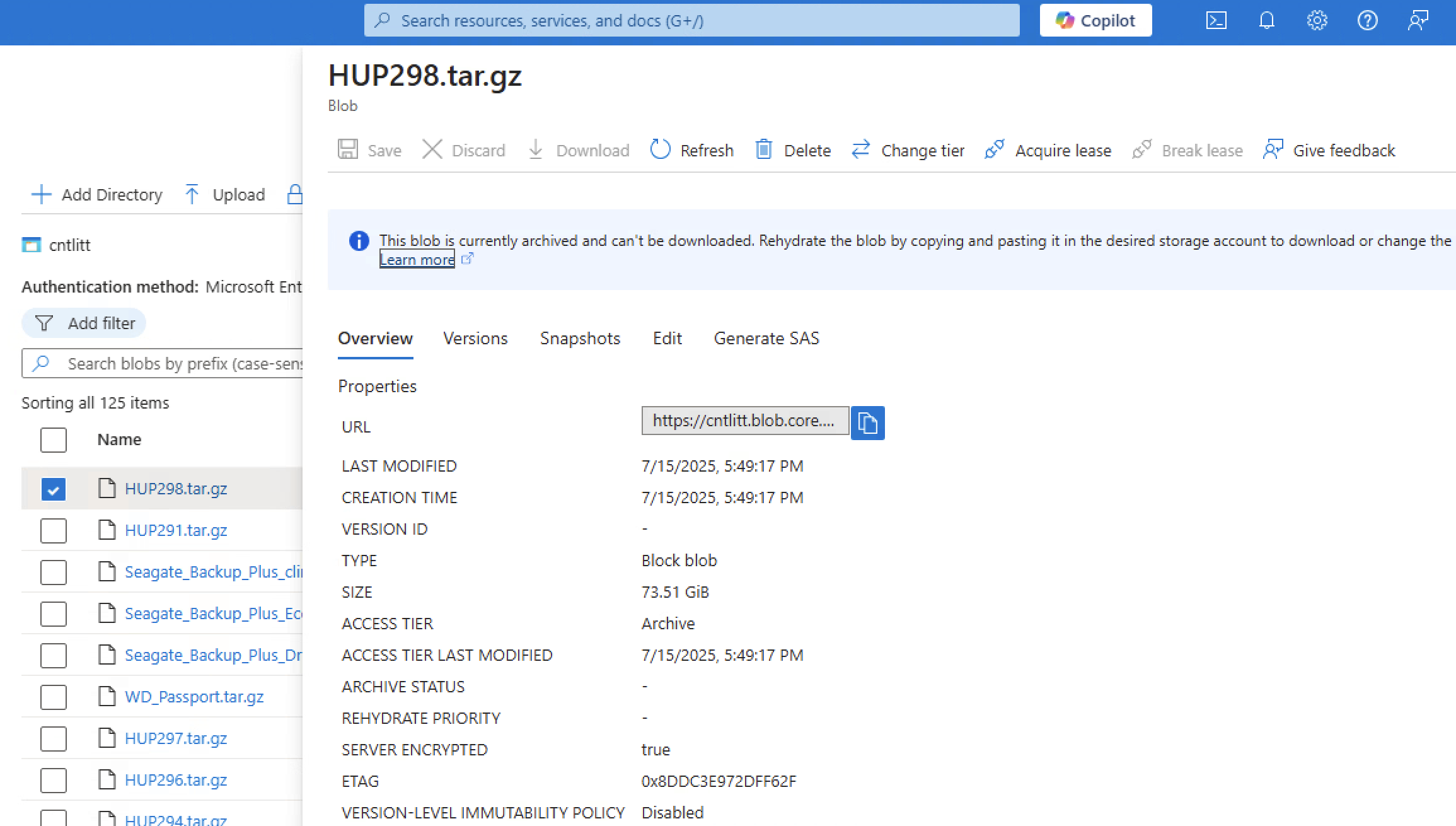
Go to the storage container and open the blob you wish to unarchive. Click "Change tier" at the top of the blob menu.
-
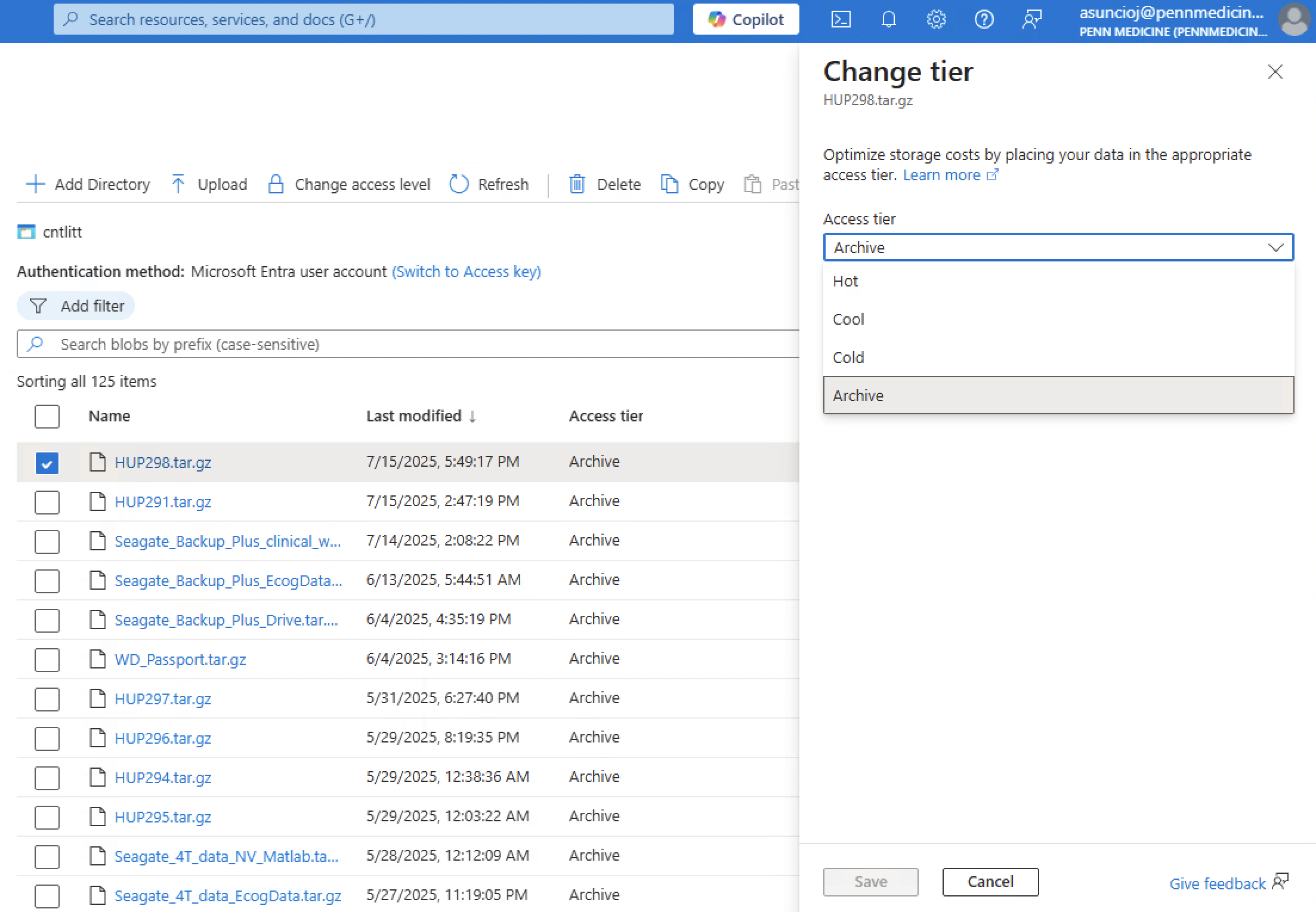
Change the tier from Archive to Cool.
- Cool tier is the lowest and cheapest tier that makes a blob available for download.
- Azure takes several hours to retrieve the data from cloud storage, so the blob is not available to download right away.
-
Download the blob by running the
download_azcli.shscript, which uses the Azure CLI to download a blob programmatically. - Once you have finished downloading the blob, change the blob's access tier back to the Archive tier.
Programs:
download_azcli.sh- This script downloads blobs from Azure cold storage (any data uploaded to Azure is called a blob). It saves the blob in the
/project/eeg_process/azure_archive/recently_unarchivedfolder. - Run this program in a Linux screen (create one with
screen -S insert_name), since it takes a while to run if the data is large. - Prerequisites:
- You need access to the cntlitt storage account in Microsoft Azure. PMACS grants access.
- The script needs a non-expired SAS token, which PMACS provides. This token is a copy of the token in
upload_azcli.sh. The token recorded when this page was written expired on 03/15/2026, so confirm with PMACS that a current token is in place before starting.
- How to run:
bash download_azcli.sh INSERT_BLOB_NAME- Example:
bash download_azcli.sh HUP1234.tar.gz- This command fails if the
HUP1234.tar.gzblob does not exist in the cntlitt storage account.
- This command fails if the
- Example:
- This script downloads blobs from Azure cold storage (any data uploaded to Azure is called a blob). It saves the blob in the
unzip_dataset.sh- Once a tarball blob has been downloaded onto
cnt1in the/project/eeg_process/azure_archive/recently_unarchivedfolder, run this script to unzip the tarball. The script writes the unzipped data to the same/project/eeg_process/azure_archive/recently_unarchivedfolder. - Run this program in a Linux screen (create one with
screen -S insert_name), since it takes a while to run if the data is large. - How to run:
bash unzip_dataset.sh /project/eeg_process/azure_archive/recently_unarchived/TARBALL_NAME.tar.gz
- Once a tarball blob has been downloaded onto
Archiving:
zip_dataset.shlist_tarball_contents.sh- Use this script when you have a tarball and want to save a list of its contents. The script creates a
tar_contents_TARBALL_NAME.loglog file in the/project/eeg_process/azure_archive/logs_zipfolder. - Run this program in a Linux screen (create one with
screen -S insert_name), since it takes a while to run if the data is large. - How to run:
bash list_tarball_contents.sh /project/eeg_process/azure_archive/staging/TARBALL_NAME.tar.gz
- Use this script when you have a tarball and want to save a list of its contents. The script creates a
upload_azcli.sh